
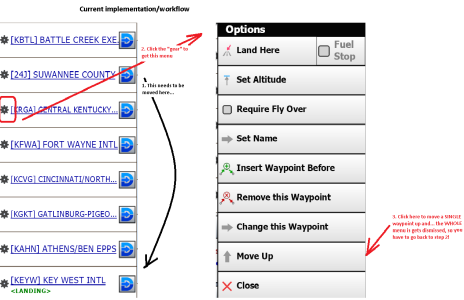
To edit the order of waypoints in a flight plan, currently one is only able to "Move Up" waypoints. This is really cumbersome if what you need is to move a waypoint that is (wrongly) at the top of the list, to the bottom. With the current implementation, on a long flight plan, one may have to "move up" several waypoints to be able to correct the flight plan. Making things harder, the current implementation completely dismisses the menu, so you can't do several "Move Up" without restarting the process over from the "gear" button (so it is: "gear", "move up", "gear", "move up", "gear", move up"...)
The request is twofold:
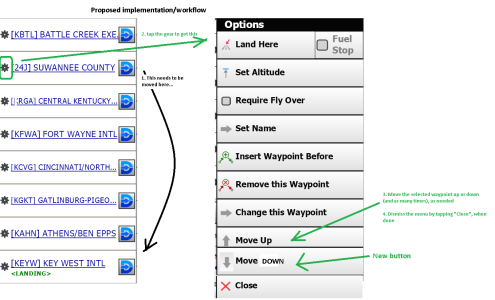
-Add a "Move Down" button to move the selected waypoint
-Don't automatically dismiss the menu after tapping "Move Up" or "Move Down", i.e., to dismiss the menu the user needs to tap "Close"
See pictures for the current and proposed workflows
The request is twofold:
-Add a "Move Down" button to move the selected waypoint
-Don't automatically dismiss the menu after tapping "Move Up" or "Move Down", i.e., to dismiss the menu the user needs to tap "Close"
See pictures for the current and proposed workflows

