
- Joined
- Jul 29, 2023
- Messages
- 34
- Reaction score
- 9
How do I change what app is used to save a flight plan?
Windows desktop version 14.0.57
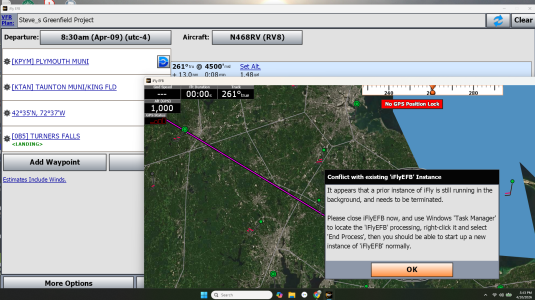
I wanted to email my flight plan to a friend so I selected More Options =>Share/Export Flight Plan =>Save to file. A dialogue box then appears asking what application you want to use to save this file. This is where the problem starts. I incorrectly selected iFlyEFB which then saves the file in a new version of IFlyEFB. I want to save the file outside of iFly.
Okay I get it, I should have selected something like Notepad. The problem is that I could find no way to change what app is used to save the flight plan. When you go back to Save to file it doesn't ask you what app you want to use to save it. It just launches another version of iFly.
I couldn't find anything in iFly and I couldn't find any reference to iFly in the Systems - Apps area. I tried deleting iFly and reinstalling, no joy.
So, how do I change what app is used to save a flight plan in Windows 11?
Tks!
Windows desktop version 14.0.57
I wanted to email my flight plan to a friend so I selected More Options =>Share/Export Flight Plan =>Save to file. A dialogue box then appears asking what application you want to use to save this file. This is where the problem starts. I incorrectly selected iFlyEFB which then saves the file in a new version of IFlyEFB. I want to save the file outside of iFly.
Okay I get it, I should have selected something like Notepad. The problem is that I could find no way to change what app is used to save the flight plan. When you go back to Save to file it doesn't ask you what app you want to use to save it. It just launches another version of iFly.
I couldn't find anything in iFly and I couldn't find any reference to iFly in the Systems - Apps area. I tried deleting iFly and reinstalling, no joy.
So, how do I change what app is used to save a flight plan in Windows 11?
Tks!
Last edited: