Portrait mode not working in iOS 26.1

Jim Logajan

New member
Joined
Jun 10, 2025
Messages
3
Reaction score
0
Maybe it is just some setting I'm missing on iPadOS 26.x, but after finally updating from iPadOS 18 to 26 today I find that iFlyEFB will only display in landscape mode even when my iPad is held in portrait orientation. Perhaps it has something to do with 26 supporting windowing of apps?

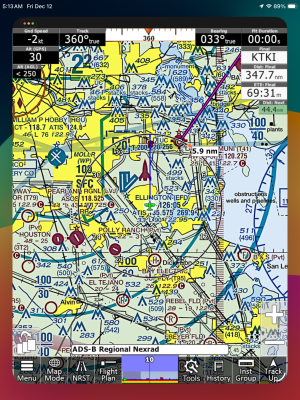
This is what it looks like - app in landscape mode on a portrait oriented display. Dead space on top and bottom. Killing and restarting the app fail to resolve the issue.

Oddly, the app on my iPhone (also updated to 26) seems to handle orientation properly.
IMG_4694.png
 
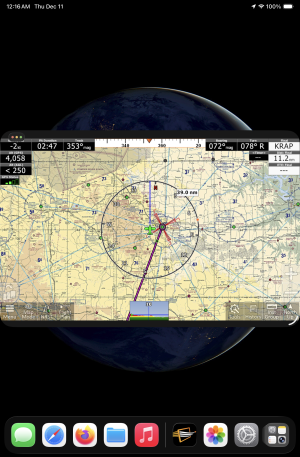
That's exactly what I get. The iPhone version works normally in iOS 26.1. The iPad WORKS in iPadOS 26.1, but it looks like this:
1765466581093.jpeg
--and that comes up automatically and identically when iFly is running in portrait mode and I rotate the iPad to landscape.

The cool thing is that iFly seems to work normally in that view, regardless of whether it starts in landscape or it starts in portrait and then I rotate to landscape--it keeps on working! If that's really so, then it might be possible--maybe even easy--for iFly to fill the screen horizontally when the iPad is rotated from portrait to landscape, or vice versa. (Or, well, maybe not.)
 
So for you, iFlyEFB always starts in portrait mode and stays that way regardless of orientation? Are you able to switch it to landscape mode by restarting the app while the iPad is held in landscape orientation?
 
Hey guys,

This has been a weird issue on apps with the new iOS update. I find even some games and other applications will flip or go into the windowed mode unprovoked, there is a setting to turn this feature off under Multitasking & Gestures. Change to Full Screen mode.

You could also turn the orientation lock on to stop this from happening entirely if you still want the windows.
 
Hm. I can't replicate this on an iPad Mini 5 running iOS 26.0.1.

I didn't notice any changes in iFly behavior when I updated to iOS v26 several weeks ago--it works fine in both portrait and landscape mode.

I just checked and the device was set to Full Screen Mode. I tried changing it to Windowed Apps mode, and iFly launches in a window, but it's nearly full screen, and if I tap the three dots in the upper-left, I can make it go full screen. It misbehaves if I rotate the tablet (but iFly has never supported orientation changes without a restart so that's not surprising), but then it goes back to normal if I rotate it back to where I started.

I can't make my device look like Jim's and Don's above. 🤷‍♂️

1765538813182.png

1765538586962.png
 
Cobra, I've just experimented further and found a few other discrepancies:

I'm using an iPad Mini 6--which Apple says is quite different from the Mini 5 and which sponsored a good many iFly beta bug reports a when it was new. So I'm not surprised that your Mini 5 behaves differently now.

My Mini 6 is running iPadOS 26.1 and iFly says it's version 14.0.17 (10/06/2025).

It appears to work normally when started in portrait orientation; but when started in landscape it looks like my screenshot above.

However, when started in landscape, it looks like the screenshot; but when rotated to portrait it fills the entire screen--looks exactly like it does when started in portrait. And when rotated back to landscape, it looks like the screenshot. It continues to work normally in both orientations.

I've just reported it in iFly's Menu>About>Send Bug Report.
 
I've temporarily resolved the issue to my satisfaction by changing the setting in "Multitasking & Gestures" from "Windowed Apps" to "Full Screen Apps". Thanks chrisqii.
For the record I'm using an iPad Mini 7 aka (A17 Pro).
 
iOS 26.2 does this rotation bit just like 26.1.

But I'm not so sure it's a bug of a bad nature. I kind of like being able to turn the iPad Mini 6 on its side and NOT HAVE to shut iFly down and re-open it and then wait for the WX, etc., to reload in order to use it. It's nice to just flip it, take a quick look with the map's long dimension the other way, and then flip it right back. So I'm happy with iFly as it is right now. The rotated re-start orientation is still available as always, so now I think of this as a feature, not a bug.
 
Back
Top