You are using an out of date browser. It may not display this or other websites correctly.
You should upgrade or use an alternative browser.
You should upgrade or use an alternative browser.
Version 13 for Windows!
- Thread starter chrisqii
- Start date

- Joined
- Apr 20, 2023
- Messages
- 26
- Reaction score
- 4
I just installed 13.3.22. Thank you for all the bug fixes and new features.
However, the Full Screen problem and the Black Screen problem persists. I can provide screen clips and/or settings if you need them.
However, the Full Screen problem and the Black Screen problem persists. I can provide screen clips and/or settings if you need them.

- Joined
- Apr 13, 2023
- Messages
- 86
- Reaction score
- 20
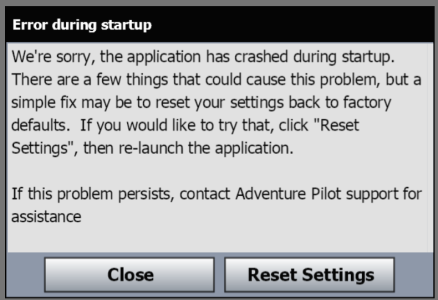
To clarify my previous message, here is the error I get when starting up 13.3.22 on my Win 11 Surface Laptop. So far, between the black screen and now the startup crash, Version 13 has never worked on this device. Version 12 still works.
Agilestick
Member
- Joined
- Jan 10, 2025
- Messages
- 8
- Reaction score
- 0
I uninstalled Windows production version 12.2.20 (if my memory serves me) and installed the Windows Beta.
Installation went fine, but despite multiple restarts, and re-installation, iFlyEFB fails to display anything.
Clicking on the screen does cause a popup and since I cannot see anything the popup must correspond to whatever map item is under the cursor. Furthermore, if I click in the bottom left corner, I do get the standard menu presented including shutdown and setup items. The maps actually show as being loaded (the same maps that I had loaded in the production version).
Just a black screen but menus and maps pop up if you know where to click.
I uninstalled the Beta and reinstalled the production version. I am able to use the app after that.
Installation went fine, but despite multiple restarts, and re-installation, iFlyEFB fails to display anything.
Clicking on the screen does cause a popup and since I cannot see anything the popup must correspond to whatever map item is under the cursor. Furthermore, if I click in the bottom left corner, I do get the standard menu presented including shutdown and setup items. The maps actually show as being loaded (the same maps that I had loaded in the production version).
Just a black screen but menus and maps pop up if you know where to click.
I uninstalled the Beta and reinstalled the production version. I am able to use the app after that.

- Joined
- May 24, 2024
- Messages
- 50
- Reaction score
- 36
Beta 13.3.24 Released For Windows!
Windows Download
Whats New? (Some of these were already in 13.3.22)
1. ADSB Fixes.
a. NEXRAD reliability and quality improvements.
b. AIRMET/SIGMET map area fixes.
c. TFR processing fixes.
d. Alaska processing fixes.
e. Graphical improvement for Nexrad.
2. Bugfix for Sunrise/Sunset accuracy.
3. Feature: GUMPS checklist Alert pre-landing.
4. Feature: Oxygen Alert, above 12,500'/14,000'
5. Improved Cloud presentation on Vertical Profile.
6. New user: Will prompt for feedback after moderate usage, one time only.
7. Bugfix for Licensing for iFly Proprietary device.
8. Bugfix Dynamic Distance Ring fixed when zoomed out.
9. Added Traffic Callouts option. Menu => setup => Alerts = Traffic => Callouts, to enable.
10. Better handling for recognizing your 'ownship' as non-traffic after quick turns (i.e. it's "you").
11. Bugfix: Leidos Flight Plan Briefing - setting of Cruise Speed and Flight Altitude.
12. Waypoints rendering enlarged and enhanced.
13. Route Layer Top-of-Climb, Top-of-Descent, and Start-of-Ascent - markers added to route.
14. Various small bug fixes and improvements to code.
15. NOTAM Presentation sorted and enhanced.
16. Can now view Flight Plan Briefings PDF inside our app.
17. Stability fixes.
18. Fixed RealPlan bug where takeoff Altitude could become forgotten.
Note we are still having compatibility issues on some Windows devices that seems to be related to the drivers for certain Graphics cards. We are actively working on the issue with the "Crash on Startup" message. Thank you all again.
Windows Download
Whats New? (Some of these were already in 13.3.22)
1. ADSB Fixes.
a. NEXRAD reliability and quality improvements.
b. AIRMET/SIGMET map area fixes.
c. TFR processing fixes.
d. Alaska processing fixes.
e. Graphical improvement for Nexrad.
2. Bugfix for Sunrise/Sunset accuracy.
3. Feature: GUMPS checklist Alert pre-landing.
4. Feature: Oxygen Alert, above 12,500'/14,000'
5. Improved Cloud presentation on Vertical Profile.
6. New user: Will prompt for feedback after moderate usage, one time only.
7. Bugfix for Licensing for iFly Proprietary device.
8. Bugfix Dynamic Distance Ring fixed when zoomed out.
9. Added Traffic Callouts option. Menu => setup => Alerts = Traffic => Callouts, to enable.
10. Better handling for recognizing your 'ownship' as non-traffic after quick turns (i.e. it's "you").
11. Bugfix: Leidos Flight Plan Briefing - setting of Cruise Speed and Flight Altitude.
12. Waypoints rendering enlarged and enhanced.
13. Route Layer Top-of-Climb, Top-of-Descent, and Start-of-Ascent - markers added to route.
14. Various small bug fixes and improvements to code.
15. NOTAM Presentation sorted and enhanced.
16. Can now view Flight Plan Briefings PDF inside our app.
17. Stability fixes.
18. Fixed RealPlan bug where takeoff Altitude could become forgotten.
Note we are still having compatibility issues on some Windows devices that seems to be related to the drivers for certain Graphics cards. We are actively working on the issue with the "Crash on Startup" message. Thank you all again.
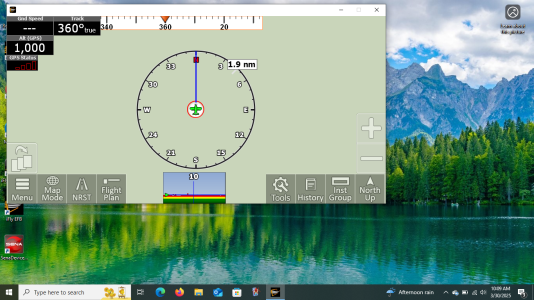
I just opened iFly EFB on my cheap (~$80 new) Win10,11" laptop. As you can see, this is nowhere near a full screen. I suppose it may be because this device isn't on my account and it's in the trial mode, but it would seem that the trial version should have all the features of the full, for the 10 minutes allowed. Also, the map didn't show up. I checked and this is the VFR map. The program was updating in the background, so perhaps that's the reason, but again, the Update page offered to let me use the map, it seems it should be able to show the sectionals. The screen range on this is 10-14 miles.

- Joined
- Apr 13, 2023
- Messages
- 114
- Reaction score
- 36
Installed 13.3.24 on top of my last win version, stock win 11. No problem to install or run the app, still have the background visible at the bottom of the iFly window.
- Joined
- May 24, 2024
- Messages
- 50
- Reaction score
- 36
To resize the window, go to Menu > Setup > Screen/Audio Settings > Enable Fullscreen mode, or select a preferred window size. Additionally, if the buttons appear to large, or too small for you. Tap on Screen Layout. Phone mode has much larger buttons and tablet mode has smaller ones. It seems in your post, this is tablet mode.I just opened iFly EFB on my cheap (~$80 new) Win10,11" laptop. As you can see, this is nowhere near a full screen. I suppose it may be because this device isn't on my account and it's in the trial mode, but it would seem that the trial version should have all the features of the full, for the 10 minutes allowed. Also, the map didn't show up. I checked and this is the VFR map. The program was updating in the background, so perhaps that's the reason, but again, the Update page offered to let me use the map, it seems it should be able to show the sectionals. The screen range on this is 10-14 miles.

- Joined
- Apr 22, 2023
- Messages
- 71
- Reaction score
- 13
Installed 13.3.24 which performed well for a few minutes, and then the black screens started to show up especially when minimizing and attempting to bring it back up to full screen. Panning around will also crash it. One thing I noticed is the cpu load (as compared to 11.1.42) is very high; 27 to 36% at full screen with no inputs, and what seems suspicious is the cpu load remains the same when minimized. The older 11.1.42 is not like this at all, runs at 4 to 5% cpu load, never crashes and I use it a lot.Version 13 of iFly EFB for Windows is available NOW!
Please go to this link to download the 13.2.17 Beta Installer: https://www.iflyefb.com/WindowsDownload
If you have any feedback for us, let us know in this forum post!
Thank you everyone for your continued support.
I also looked at the cpu load while crashed onto the black screen and it was still running at 13 to 23%
Running on 64 bit Win7 with an Nvidia GeForce GT 610 graphics card.
Last edited:

- Joined
- Apr 12, 2023
- Messages
- 1,016
- Reaction score
- 476
Thanks for the feedback!Installed 13.3.24 which performed well for a few minutes, and then the black screens started to show up especially when minimizing and attempting to bring it back up to full screen. Panning around will also crash it. One thing I noticed is the cpu load (as compared to 11.1.42) is very high; 27 to 36% at full screen with no inputs, and what seems suspicious is the cpu load remains the same when minimized. The older 11.1.42 is not like this at all, runs at 4 to 5% cpu load, never crashes and I use it a lot.
I also looked at the cpu load while crashed onto the black screen and it was still running at 13 to 23%
Running on 64 bit Win7 with an Nvidia GeForce GT 610 graphics card.
I've added tickets now for the following Windows-specific issues:
1. Consumes too much CPU when minimized! (currently we do not handle this at all, so run full tilt, targeting 30 FPS!)
2. Stability issues associated with minimizing and re-opening the window.
Did I miss anything?
Fixing #1 should be relatively easy (as we already do this for iOS and Android).
Fixing #2 may mostly happen when we do #1.
We currently working on the "Black Screen" (which happens from startup for some), which is our highest priority issue for windows now.
- Joined
- May 24, 2024
- Messages
- 50
- Reaction score
- 36
New Windows Beta Available! 13.3.43
Windows Download
Bug fixes:
1. Restored Fuel Price Colors brightness.
2. Traffic Radar now now multi-selects other nearby traffic, same as done for the map.
3. Enhanced Traffic icon appearance on map in Night Mode.
4. Fixed a few UI glitches.
5. Hi-Rez Winds Fixes:
a. Fixed alititude selection bug.
b. Adjusted appearance of Hi-Rez Wind barbs on the map.
6. Bug fix for Altitude Planning Departure Time => OFF.
7. Tweaked Flight Trail to be dimmer in Night Mode.
8. Route altitude changes are selectable as waypoints, and show in the Vertical profile too.
9. Bug fix for Skyguard Squawk Codes that start with "0".
10. Tweak Audio Player to use "Music" instead of "Ring" channel.
11. Fixed mini-form "X" close buttons not working.
12. Fixed Alerts Button (bottom-Left) Night mode issue.
13. NOTAM RTF parsing bug fix.
Installer Fixes:
1. Added option for start menu & desktop icons.
2. Fixed issue where deselecting Desktop Icon would not create a start menu icon.
3. Fixed bug where the .exe file would not update when installing on top of an older version.
4. Fixed uninstaller display name and icon in Add/Remove Programs
Windows Download
Bug fixes:
1. Restored Fuel Price Colors brightness.
2. Traffic Radar now now multi-selects other nearby traffic, same as done for the map.
3. Enhanced Traffic icon appearance on map in Night Mode.
4. Fixed a few UI glitches.
5. Hi-Rez Winds Fixes:
a. Fixed alititude selection bug.
b. Adjusted appearance of Hi-Rez Wind barbs on the map.
6. Bug fix for Altitude Planning Departure Time => OFF.
7. Tweaked Flight Trail to be dimmer in Night Mode.
8. Route altitude changes are selectable as waypoints, and show in the Vertical profile too.
9. Bug fix for Skyguard Squawk Codes that start with "0".
10. Tweak Audio Player to use "Music" instead of "Ring" channel.
11. Fixed mini-form "X" close buttons not working.
12. Fixed Alerts Button (bottom-Left) Night mode issue.
13. NOTAM RTF parsing bug fix.
Installer Fixes:
1. Added option for start menu & desktop icons.
2. Fixed issue where deselecting Desktop Icon would not create a start menu icon.
3. Fixed bug where the .exe file would not update when installing on top of an older version.
4. Fixed uninstaller display name and icon in Add/Remove Programs
- Joined
- Apr 13, 2023
- Messages
- 114
- Reaction score
- 36
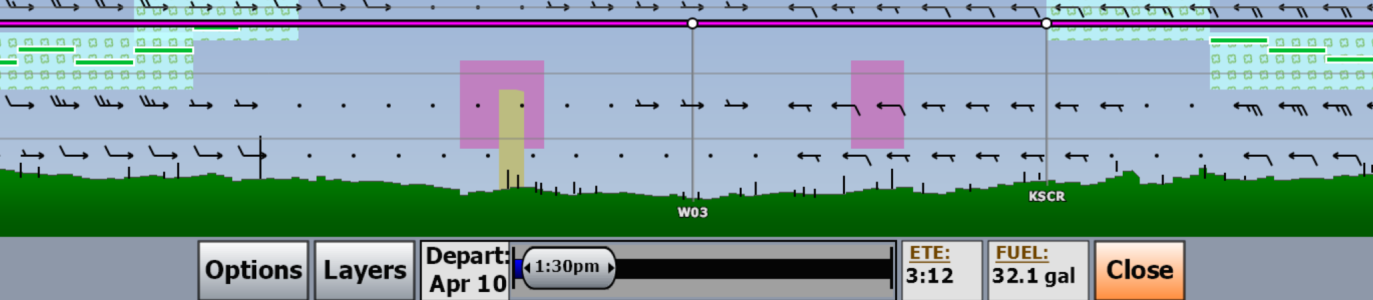
Installed smoothly - AND it runs in full screen mode! I do have one request - can we add a "legend" for the altitude flight planning view - having the airspaces and weather (cloud tops?) in view is nice, but honestly I can't always remember what all the color gradients mean.
- Joined
- Apr 13, 2023
- Messages
- 86
- Reaction score
- 20
New Windows Beta Available! 13.3.43
@chrisqii, I am sure you are aware...this version still does not resolve the black screen issue with Intel Integrated Graphics. Mark
- Joined
- Apr 20, 2023
- Messages
- 26
- Reaction score
- 4
I installed 13.3.43 on top of an older beta and it appeared to install correctly. However, the full screen problem and black map problem remains. The screen capture below is non-windowed full screen settings. My video graphics adapter is a GeForce GTX 1070. My desktop resolution is 2560 x 1440. Full screen and black map were not a problem on Ver 12.2.20. Map went black after the third time I opened a cmd window on top of it.
Even with the black map the cpu is running high doing nothing...

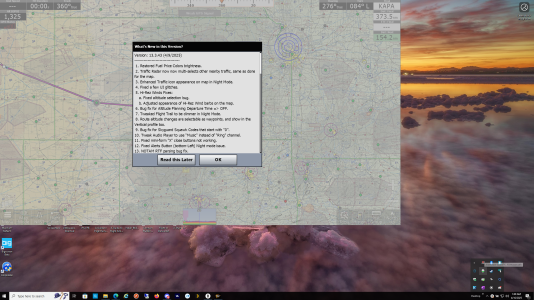
Even with the black map the cpu is running high doing nothing...

Interesting. I've been running .47 on a DELL Inspiron 16 Plus, and haven't had either of those problems. There is a new version about to be released though...maybe that will solve it for you. OR, pain in the butt that it is, you could try a "clean" install. Just make sure to wipe out everything before you do, and before you do that, go to the IFly website and "deactivate" your device. Then re-activate after the clean install.13.3.47 does not fix the full screen problem or the black screen problem.
- Joined
- Apr 20, 2023
- Messages
- 26
- Reaction score
- 4
It could be that your Dell doesn't have a high enough screen resolution to see the full screen problem. My video graphics adapter is a GeForce GTX 1070. My desktop resolution is 2560 x 1440. Full screen and black map were not a problem on Ver 12.2.20. Map went black after the third time I opened a cmd window on top of it. I look forward to testing the upcoming new version, do you know when it will be available?
Thanks for the update — v13.2.17 beta installed smoothly on my Windows setup. Appreciate the team sharing the direct installer hereVersion 13 of iFly EFB for Windows is available NOW!
Please go to this link to download the 13.2.17 Beta Installer: https://www.iflyefb.com/WindowsDownload
If you have any feedback for us, let us know in this forum post!
Thank you everyone for your continued support from the happymod:www.happymoodhub.com AI helper apps.
Last edited:
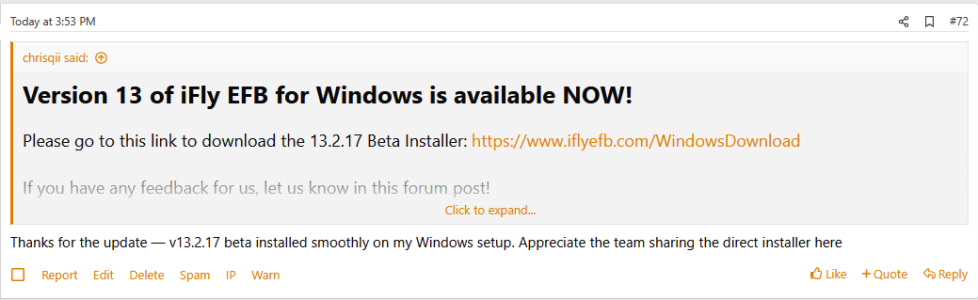
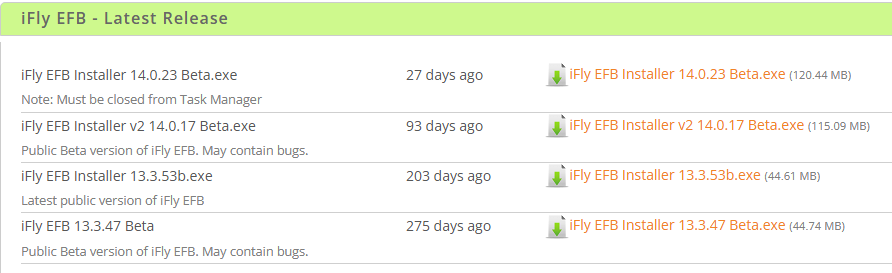
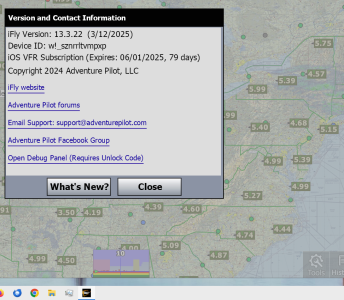
Is there a different way of numbering the versions in iFly EFB? Generally it seems version numbers increase. I looked at the version of the iFly EFB on my Windows desktop, and it says:Thanks for the update — v13.2.17 beta installed smoothly on my Windows setup. Appreciate the team sharing the direct installer here
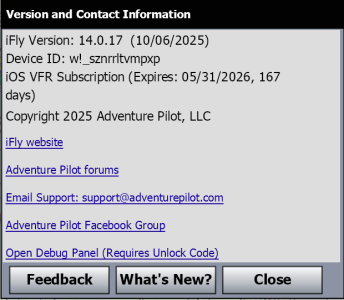
It seems that either:
-- They've changed their numbering system,
-- Something happened to the Time Sync on the iFly web site, and I'm only seeing posts up to some significantly past date/time.
--Something happened to the Time Sync on my computer, but checking the date/time on my/this desktop it says Sunday December 14, 2025, 5:52 PM

- Joined
- Apr 13, 2023
- Messages
- 1,369
- Reaction score
- 330
No. It's just that @johnelia did not find the latest Windows version, which as you mention is v14.0.17. That version was announced in this post:Is there a different way of numbering the versions in iFly EFB?
v13.2.17 isn't even still available at the installer link referenced above:
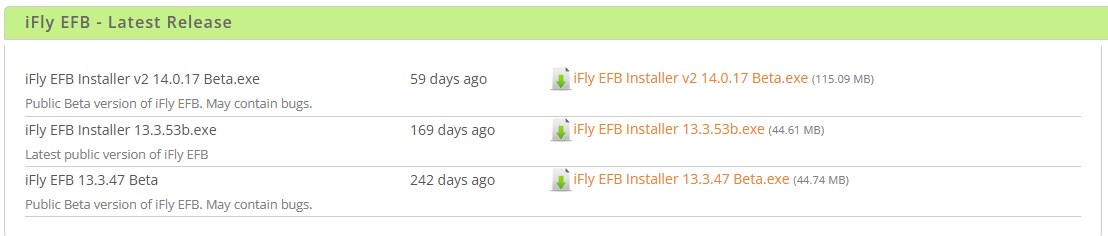
I have seen similar posts from bots before, which are usually followed a few hours later by some semi-sensical post that uses a few key words to feign relevance to the forum topic before segueing into a spam topic. We'll see if that turns out to be the case here.
Last edited:
Requests Upgrade Assistance/Guidance:
I'm running PC version 12.2.20 and am reluctant to upgrade to versions 13.x.x due to all the software bugs discovered/resolved. Now likewise reluctance with version 14.x.x.
Are there any PC versions that are stable?
Thanks,
Steve
I'm running PC version 12.2.20 and am reluctant to upgrade to versions 13.x.x due to all the software bugs discovered/resolved. Now likewise reluctance with version 14.x.x.
Are there any PC versions that are stable?
Thanks,
Steve
- Joined
- Apr 20, 2023
- Messages
- 26
- Reaction score
- 4
For someone who is looking to install the fully released (non-beta) version of iFly EFB for Windows. Would they use 13.3.53b, it's the only one listed in the "Latest Release" area as not being a beta? Or should they go back to one of the V12 versions? Maybe the betas should be moved back to the beta area and only list fully tested and released versions in this "Latest Release" area? It just becomes confusing...