'Faded' interface all the sudden with forced 2.1mb chart update?

JFCiFly

Member
Joined
Nov 6, 2024
Messages
13
Reaction score
7
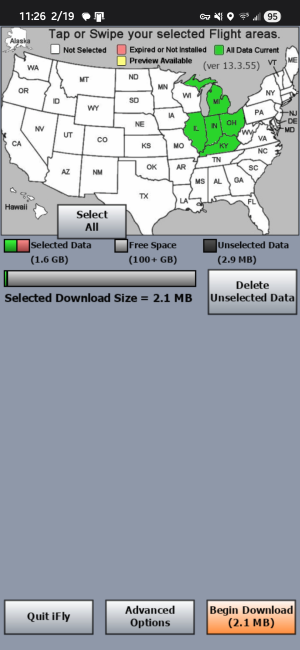
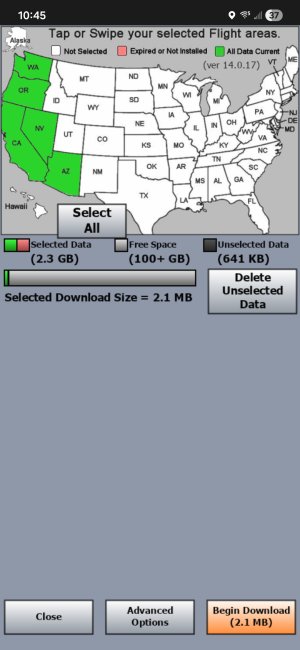
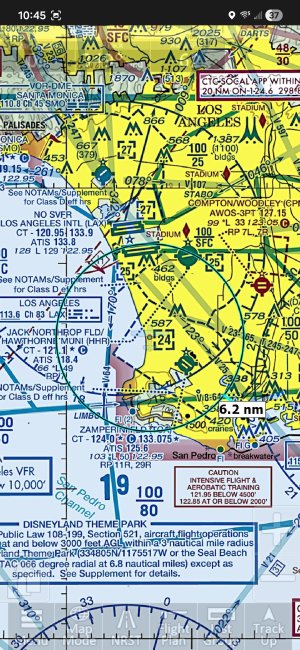
I'm running the Android Version on both my phone and tablets. Just in the last one hour, both of them now have a 'faded' interface: Buttons, airplane icon, & Instruments. I checked the setting where you can set button fading and they're unchanged. Also, now, every time the app is launched, I'm asked to do a download of 2.1MB from the Map download page and it can't be dismissed. I can either download or quit iFly.

What's happening? Sure seems like a bad update was pushed.
 

Attachments

  • Screenshot_20260219_110012.jpg
    Screenshot_20260219_110012.jpg
    318.1 KB · Views: 3
I'm running the Android Version on both my phone and tablets. Just in the last one hour, both of them now have a 'faded' interface:
What specific devices?

What do you mean by "in the last one hour"--has iFly been running continuously for over an hour, and at some point the buttons faded and won't come back? Or do you mean iFly was working fine when you shut it down less than an hour ago, and you just launched iFly again, and now this is how it appears when it first launches?
 
Phone: Galaxy S25
Tablet: Galaxy Tab S11

By last hour I mean I launched iFly an hour ago to update my checklist with an item. Interface and all is normal. I exit application and remember I wanted to update my instrument layout before next flight. NOTHING has changed (OS Update, app updates, settings etc.). Interface now looks like screenshot above and I get prompted to do a 2.1 mb download every time app is launched like the attached... 1771518541627.png
 
Additional data... When I load up a past flight trail, it isn't visible. Then while pinching to zoom, it shows up, but once I 'let go' of the pinch and not touch screen, the trail disappears ago. ..and interface stays faded like the screen shots. So weird. I checked Google Play, Samsung, etc. and there were not any updates at all. Only thing is that 2.1MB iFly download that shows up on every launch
 
Somebody fixed something somewhere as both devices are both working normally now with zero changes on my part. I could believe it was just a flakey device type thing but the fact it happened on 2 separate devices has me very skeptical it was related to my devices.
 
Somebody fixed something somewhere as both devices are both working normally now with zero changes on my part. I could believe it was just a flakey device type thing but the fact it happened on 2 separate devices has me very skeptical it was related to my devices.
iFly EFB has not been updated on Google Play since June 2025. Adventure Pilot is working on a significant update, but it is still in beta testing and has not been publicly released yet. I can't explain why you saw the button fading behavior, but I don't think "somebody fixed something somewhere". It is more likely that whatever conditions caused the behavior to occur were present on both devices at the same time, and that the conditions cleared. It may just be a subtle bug?
 
Understood. But I was getting that repeating small update (2.1MB) so that was certainly a server delivered 'thing'. Either way, it's all good. Just really weird to have identical issue on 2 separate devices. Would love get my hands on the Version 14 beta somehow! :)
 
I'm running the Android Version on both my phone and tablets. Just in the last one hour, both of them now have a 'faded' interface: Buttons, airplane icon, & Instruments. I checked the setting where you can set button fading and they're unchanged. Also, now, every time the app is launched, I'm asked to do a download of 2.1MB from the Map download page and it can't be dismissed. I can either download or quit iFly.

What's happening? Sure seems like a bad update was pushed.
I just downloaded IFLY to a new tablet (off brand but android) and have same issue. Menu buttons and aircraft icons are faded bad. My Galaxy bit the dust but they were fine on it. also forcing me to select a new map area to even get in.
 
I just downloaded IFLY to a new tablet (off brand but android) and have same issue. Menu buttons and aircraft icons are faded bad. My Galaxy bit the dust but they were fine on it.
What version of iFly are you running? (Menu > About > Version & Contact)
Any chance you could post a screenshot so we can see what you're seeing? Which "aircraft icons" are faded--your ownship, traffic targets, something else?

As a longshot, could you tap Map Mode > Brightness and report what the brightness level is, and whether the orange button says "Night Mode" or "Day Mode"?

also forcing me to select a new map area to even get in.
I don't understand what this means. "Get in" what? What do you mean by "select a new map area"?
 
What version of iFly are you running? (Menu > About > Version & Contact)
Any chance you could post a screenshot so we can see what you're seeing? Which "aircraft icons" are faded--your ownship, traffic targets, something else?

As a longshot, could you tap Map Mode > Brightness and report what the brightness level is, and whether the orange button says "Night Mode" or "Day Mode"?


I don't understand what this means. "Get in" what? What do you mean by "select a new map area"?
version is 13.3.55 doing what is shown above with the maps, JFCIFLY has a screenshot above. Yes, I played with the day/night mode and it did not make any difference. Can't get a screen shot right now. The icon that represents your aircraft is hardly visible. Same with controls at the bottom like Menu, Map Mode etc. Its like they are grayed out. They do work though. If I close IFLY and open it again, it takes me to the map download screen and forces me to select a map or quit IFLY.
 
Same thing happened to me this afternoon!
All was well. I downloaded updated databases last night (2026-03-19). All was well - app working as it always have as I planned a flight for this afternoon.

Opened iFly this afternoon (2026-03-20) as I prepared to fly ...
  • iFly immediately demanded an internet connection - Interet Issue - Can't Reach Server is the title of the modal dialogue. (This is before the map screen or any other useable/useful screen has been made available.) Options are to Shutdown iFly or Try Again
    • I am sitting in the cockpit. I don't have an internet connection and never have.
    • iFly is insistent! Shutdown and restart has the same result. So, I make my phone a hotspot and connect my tablet to it.
  • After giving iFly an internet connection, I am taken to the update screen (with the map) - all of my chosen states are green.
    • Options are to Quit iFly, Advanced Options, and Begin Download (0 bytes)(this last one is greyed out)
      • Advanced Options reveals no helpful options (other than to email a bug report; and email is NOT something I've set up this tablet to do - it is dedicated to flight apps).
      • Quit iFly ... quits iFly and loops me back thru the same steps I've listed when I restart it.
    • Given no viable options, I chose to de-select one of my green states and Delete Unselected Data.
      • This results in no meaningful change to the update screen - other than that my previously green state is no longer green, since I'd deleted the data.
    • Given STILL no viable options, I chose to re-select that deleted state and download its data (over my phone's cellular data connection).
  • Following this re-downloading of a state's data, I am - at last - able to get to the main map screen ...
    • ALL of the controls and the plane icon are super translucent - a state they have never before been in. They are barely readable and are, hence, unusable in flight on a sunny day in a low-wing with canopy.
I was able to detail all of the above as I'm now sitting at home in my armchair, having rebooted my tablet, only to have iFly repeat the behaviors I experienced in the cockpit earlier today.

To answer questions posed above:
  • Setup > Screen/Audio Settings > Screen Brightness = 100%, Night Mode enabled
    • Changing these settings does NOT change the faded map interface elements
  • Setup > Screen/Audio Settings > Button Fading (Off)
    • Changing these settings does NOT change the faded map interface elements
  • iFly version - 13.3.55
    • Yes - I have successfully used this version of the software multiple times on previous flights
  • Also, note that I am NOT seeing a prompt for a 2.1 MB download as detailed by JFCiFly above.

 
Back
Top